Personal AI project
Job Search OS: an AI-assisted system I designed and built
It supports every stage of my job search, from finding new postings to preparing for interviews. AI handles the repetitive work: finding and scoring roles, drafting research briefs, and tailoring application materials. I make the calls: which roles to pursue, how to position my experience, and what gets sent.
- Role
- Product owner and system designer
- Built with Claude from briefs I wrote and tested
- Timeline
- Aug 2026–Present
- Ongoing; I refine it as I use it
- Scope
- Six stages, end to end
- Find, research, build, review, reach out, and prepare
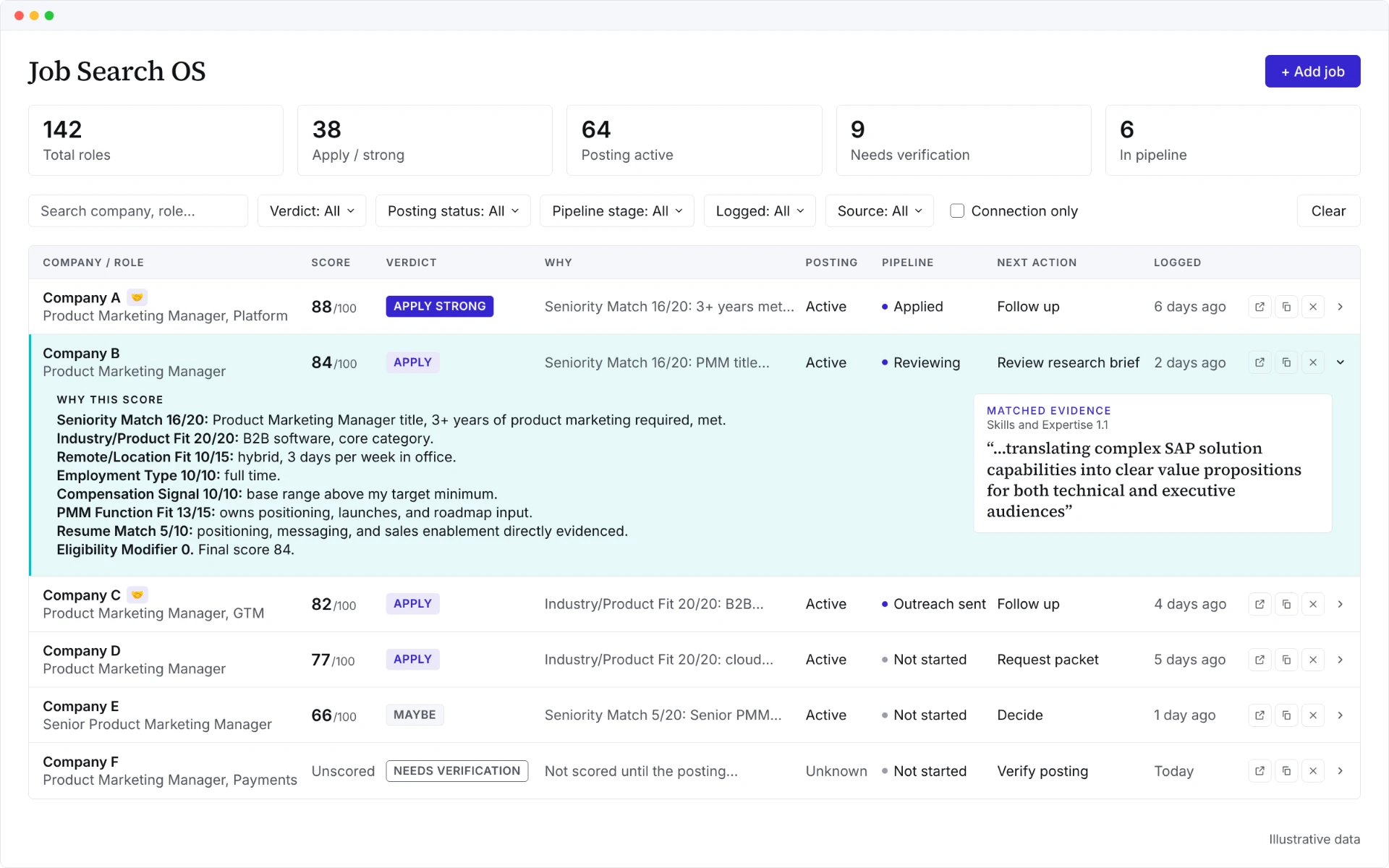
Representative dashboard view with illustrative data. Company information anonymized.
Built with
Claude
AI analysis, drafting, custom skills
Supabase
Database and dashboard

GitHub
Code and scheduled automation
Google Apps Script
Workflow automation
Perplexity
Company and market research

Clay
Contact research
Google Gemini
Mock interviews
Google Drive
Document storage
Gmail
Email and outreach
Context & Problem
Why I built it
Every stage of my search was manual and scattered. I wanted my time to go to choosing the right roles, telling the right story, and talking to the right people.
Research each company the way I’d research a market, then use that insight to position my candidacy.
System Design
How it works
Each stage splits the work between scripts (no AI), AI tools, and me.
- 1
Find and prioritize
New postings verified, scored, and added to my Supabase dashboard each morning, with the top roles in a daily email.
Scripts
Pulls new postings from target companies' applicant tracking systems and my job-alert emails, removes duplicates, and flags closed roles.
Claude
confirms each posting is live, filters out roles that miss my criteria, and scores the rest on my 100-point rubric, with a reason for every score.
My call
which roles to pursue, picked from the dashboard.
I wrote the criteria and the rubric myself and calibrated them against my own judgment on real roles before letting them run. Every score quotes a line from my experience that shows the match.
- 2
Research
A sourced brief on each company and role, plus the connections worth reaching.
Perplexity
Gathers sourced evidence on the role and the company's ICP, positioning, and competitors from a research prompt I wrote.
My call
What my application should focus on (what stands out, why I’m drawn to the role, gaps to address), and which of my connections to reach out to.
Claude
Turns the Perplexity evidence and the job posting into a research brief.
I modeled my research prompts on how PMMs approach competitive and market research. For contacts, the dashboard shows my LinkedIn connections who work at the company now or used to, plus links to second-degree contacts I can ask for an introduction. My notes and the brief then shape what the cover letter argues, how outreach opens, and what I prepare for in interviews.
- 3
Build
An application packet for each role: a tailored resume, cover letter, and outreach drafts.
My call
When to request the packet, once research is done.
Claude
Finds the hiring manager and recruiter through Clay, drafts the resume, cover letter, and outreach in my voice, and checks every claim against my records.
Scripts
Builds Word files from my own templates and checks that the resume fits on one page.
Drafts come from the brief, my notes, and custom Claude skills I built. Each outreach message fits the relationship: a note to a connection, a request for an introduction, or a note to the hiring manager or recruiter. Each packet lands in its own Google Drive folder, ready to edit.
- 4
Review and improve
A final packet I approve, revised from my notes.
My call
Edit each draft and leave notes, then approve the final packet and decide which notes become rules.
Claude
Revises the packet from my notes and suggests which notes should become rules for every application.
Each new rule goes into the skill, so every packet starts better than the last.
- 5
Reach out and apply
An outreach plan for each role in the dashboard, with drafts and follow-ups ready in Gmail.
Claude
Puts approved outreach into Gmail as drafts, drafts follow-ups, and checks for replies.
My call
Edit and send every message myself in Gmail, LinkedIn, or Slack, and decide when to apply.
The dashboard lists each role’s outreach in the order I send it and tracks every message and reply.
- 6
Prepare for interviews
Prep briefs and mock interviews for every round, built around who I'm meeting.
Claude
Builds prep briefs for each round, debriefs each interview against that prep, and drafts thank-you notes.
Gemini
Runs voice mock interviews from each round's prep brief, gives honest answer-by-answer feedback, and flags my recurring weak spots.
My call
Review each brief, practice out loud before every round, and edit and send every thank-you note myself.
Each brief matches my experience to the role's must-haves, maps panelists' backgrounds to likely questions, and prepares answers to likely objections.
Impact
What changed
Finding roles
Before
Manual searches across job boards and alerts, including stale or filled roles.
After
A prioritized shortlist each morning, with evidence behind every score.
Applications
Before
A day or more each, and still not as thorough as I wanted.
After
Researched and tailored for each role, so my time goes into deciding what to say.
Tracking
Before
Manual spreadsheet tracking, with inconsistent and incomplete details.
After
One dashboard tracking the entire pipeline: every role, research brief, packet, outreach draft, and interview.
Interview prep
Before
One generic doc to memorize, plus last-minute research.
After
Prep specific to each company and round, built around key points and practiced out loud.
Approach
How I built it
I defined the rules before automating anything: search filters, a scoring rubric, career reference docs, and writing rules. For every change, I wrote a brief with what it should do and how I’d test it, had Claude build it, and tested it before it went live. The code lives in a private GitHub repository, so every change is versioned and needs my approval, and recurring issues become automatic checks.
I built my own Claude skills for applications, interview prep, and my writing voice, adapting free frameworks from LinkedIn, newsletters, and webinars and testing each against real applications until the output sounded like me and met my accuracy rules.
Skills in practice
Company and market research
Reading each company’s market before deciding how to position myself.
Positioning and messaging
Turning that research into the story each application leads with.
AI workflow design
Deciding what to automate, what to give Claude, and what to keep for myself.
Accuracy and quality control
Building checks so nothing inaccurate goes out under my name.
Key decisions
Judgment stays with me
The system drafts and recommends, but never applies or sends anything on my behalf. Every role I pursue and every message that goes out is one I chose and edited myself.
No score without a verified posting
Early on, the posting checker kept showing filled roles as open. I caught it when a manual check didn’t match the dashboard, so I changed how the system confirms a role is live. Now a role that can’t be verified gets no score.
Every claim traces to a source
My career history, accomplishments, and metrics live in reference docs in Google Drive that only I edit. Everything the system writes about me has to trace back to them, and a QA step removes any claim I couldn’t defend in an interview.
The right tool for each job
My Google Sheet kept creating duplicates whenever the automation touched it, so I moved to a Supabase database, which let the dashboard become the hub for every step. When scheduled runs hit usage limits, I moved routine work like collecting postings from AI to scripts and matched each task to the right AI model, so AI is reserved for analysis and drafting.
Learnings
Lessons from building with AI
Rules don’t add up to a good draft
As I reviewed drafts, I turned recurring edits into rules. Claude checked each draft against every rule one by one, and after a few rounds my resumes, cover letters, and outreach followed every rule but read like a checklist, not a strong application. Now Claude reviews each draft as a whole after the rule checks, and I review it line by line and as a whole.
Start small, then automate
I wanted to build everything at once, but every new feature surfaced new issues, so I fixed the urgent problems first and came back to the rest. Some features started partly manual on purpose: I searched Clay for contacts by hand until that worked, then automated it. Now Clay looks up a contact with each packet request, and I fill any gaps.
Build for change
AI tools evolve quickly, so the system needs ongoing refinement. I test new models and features, then update my skills and prompts as capabilities and best practices change.
Next Steps
What I’m building next
Next, I’m adding more checks and feedback loops, going deeper on PMM-specific company research, and packaging it so others can adapt it for their own job search.
Contact
Let’s connect
Tampa Bay, FL
Open to remote product marketing roles with U.S.-based companies and willing to relocate for hybrid opportunities in San Francisco, New York City, and other major cities.